Menu Bar | ||
| ||
PLM Access
The PLM Access Menu mentions about the commands available.
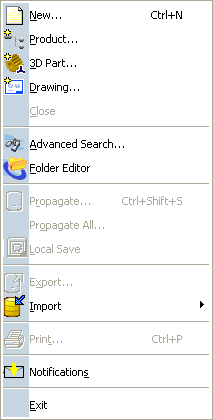 |
New
Product...
3D Part...
Drawing...
See Creating Task from WinTop Applications and Web UI CloseSee Closing Objects Advanced Search...See the 3D Live User Guide Propagate.. Export...See Saving Objects in Other Formats Export... (3D XML context) See Exporting 3D XML Files in the Infrastructure User Guide Import > 3D XML...See Importing 3D XML Files in the Infrastructure User Guide. Import > File... See Data Exchange Interfaces User GuideImport > CATIA File... See Running the FBDI in Interactive Mode Print...See Customizing Print Settings Before Printing Your Documents in Live ENOVIA V6 Connector Exit |
Edit
The Edit menu let you manipulate selected objects. Please refer to the Infrastructure Menu Bar documentation.
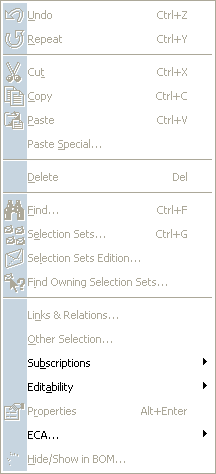 |
Cut, Copy, Paste
See Using Copy, Cut and Paste in Task Management Editor DeleteSee Deleting Objects in the VPM Physical Editor User Guide Links & Relations...See Editing Links and Relations in the VPM Physical Editor User Guide PropertiesSee Modifying Product Properties in the VPM Physical Editor User Guide ECA... > Current ECA PropertiesSee ECA Properties Sheet Editor...See Using the Sheet Editor in the VPM Physical Editor User Guide |
View
The View Menu mentions about the commands available.
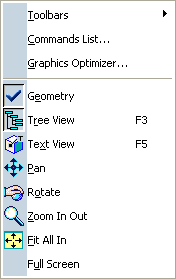 |
Toolbars
See Viewing and Hiding Toolbars Commands List... Graphics OptimizerSee Optimizing the Graphics Perform GeometrySee Using the Geometry Overview PanSee Panning RotateSee Rotating Zoom In OutSee Zooming In See Zooming Out Fit All InSee Fitting All Geometry in the Geometry Area Full Screen |