Inserting a Part on a Pipe | ||||||
|
| |||||
Click Place Part
 in the Compass Toolbar.
A balloon opens.
Select Place on Segment
 .
.
Select a part.
For more information, see Selecting a Part.
Note: The part can be selected before activating the Place on Segment option.
The part is inserted on the pipe and new options are displayed in the balloon to let you position the part.
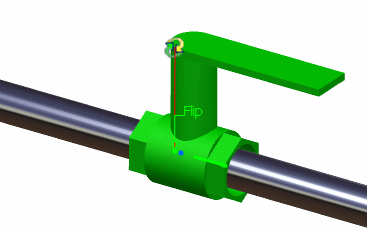
Position your part using the different options available.
- Orient
 : allows you to change the angle position of the part by manipulating the axis.
 - Move
 : allows you to move the part on the pipe.
 - Flip
 : allows you to change the direction of the part.
For more information, see Positioning Parts.
Note:
- Nominal size must be defined for the pipe for filtering to occur.
- If the option Perform compatibility checking is not selected then the application will filter on the nominal size only. However, a part with any nominal size can be placed.
- Orient
Click Commit
 to validate the position of the part.
The pipe is cut into two segments and connections are created.
Important: When you click Commit after having selected a part, a placement method and the segment location for placing a part, space for placed part is checked. If the placed part is overlapping with the existing node of the pipe or if it is impossible to create a directional point, select another location for placement.