Connection Dialog Box | ||||
|
| |||
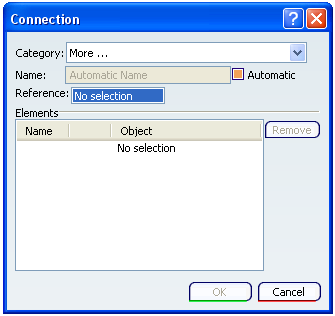
Category
Select the appropriate category from the Category list.
To select the category defined in the Project Dictionary Resource set in Project Resource Management, select More in the Category list. The Types Browser Dialog Box appears.
By default, catagories available for selection are: Connection Braces, Connection Column 1 Beam, Connection Complex, Connection Diamond Plate, Connection Column 2 Beams, Connection Pillar to Plate and Connection Star Gusset.

Name
A name is assigned automatically, using the object naming rules. It is displayed in the Name box. If you want to assign your own name, clear the Automatic check box and enter the name.