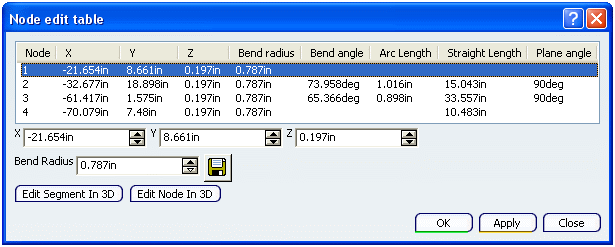
 Node Edit Table
- Node
- The Node column displays the serial number of the node.
- X
- The X column displays the X coordinates of the node.
You can edit the X coordinates of the selected node in the X box at the bottom side of the dialog box.
- Y
- The Y column displays the X coordinates of the node.
You can edit the X coordinates of the selected node in the Y box at the bottom side of the dialog box.
- Z
- The Z column displays the X coordinates of the node.
You can edit the X coordinates of the selected node in the Z box at the bottom side of the dialog box.
- Bend Radius
- The Bend Radius column displays the bend radius of the route.
You can edit the bend radius of the route in the Bend Radius box at the bottom side of the dialog box.
- Bend Angle
- The Bend Angle column displays the corner angle between two consecutive nodes.
- Arc Length
- The Arc Length column displays the arc length.
- Straight Length
- The Straight Length column displays the length between two consecutive nodes.
- Plane Angle
- The Plane Angle column displays the angle between two consecutive segments.
- Edit Segment In 3D
- Select the Edit Segment In 3D option to manipulate the segment in 3D graphic area. For more information, refer to Manipulating Route Segments.
- Edit Node In 3D
- Select the Edit Node In 3D option to manipulate a node in 3D graphic area. For more information, refer to Creating and Modifying Nodes by Manipulation.
|