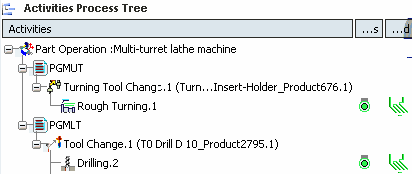
Double-click Manufacturing Program PGMUT in the Activities Process Tree.
See Creating a Manufacturing Program and Machining Activities
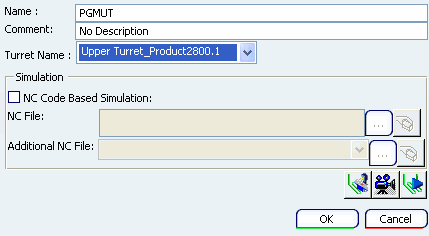
Select Upper Turret using the Turret
Name combo box.
Note:
When a Manufacturing Program is edited, its associated turret and corresponding turret axis system are highlighted in the 3D view. This is applicable for mill turret also.
See 3D Feature for Program
Click OK to assign the Manufacturing Program to the turret.
Right-click the PGMUT in the Activities Process Tree and select
Compute Tool Path.
The tool path of the Rough Turning
operation is computed and the Activities Process Tree is updated with this information.
Double-click the Activities Process Tree PGMLT in the Activities Process Tree.
Select Lower Turret using the Turret
Name combo box.
Right-click PGMLT in the Activities Process Tree and select
Compute Tool Path.
The tool path of the Drilling operation is
computed and the Activities Process Tree is updated with this information.