Reference Compensation Point for Tool Assembly Gauges | ||||
|
| |||
Reference Compensation
The Reference Compensation option is defined
in the Tool Assembly tab
 in the
Tooling page
in the
Tooling page
 .
.
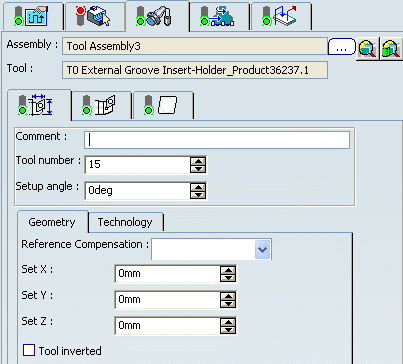
The Gauge values are defined for the specified tool compensation point (for example, P3).
When the active tool compensation point is different from the reference tool compensation point (for example, P4), then output parameters of the gauges are computed according to the tool insert geometry.
All insert types (round, diamond, square, triangular, trigon, and groove) are supported for computed parameters.
The Reference Compensation option is also available
for a Multi-Slide Lathe Tool Change in the Tool Assembly tab
of the tool
change editor.
Example of Square Insert: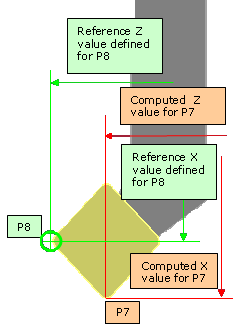
On the tool assembly, reference compensation is defined for P8 compensation point and gauges (set X, set Y, set Z values) are defined for this point.
When using another active compensation (Tool compensation
defined in Strategy page
 )
(P7 point), the computed X, Y, and Z gauges are output according to this
point (P7 point).
)
(P7 point), the computed X, Y, and Z gauges are output according to this
point (P7 point).
Example of Groove Insert: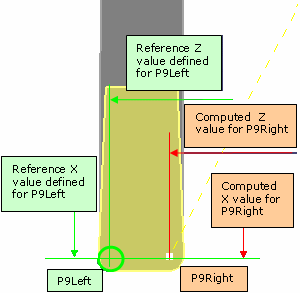
On the tool assembly, reference compensation is defined for P9Left compensation point and gauges (set X, set Y, and set Z values) are defined for this point.
When using another active compensation (P9Right point), the computed X, Y, and Z gauges are output according to this point (P9Right point).

Output File
The following parameters allow you to output the gauge values
corresponding to the active tool compensation point.
- MFG_CMP_TL_SET_X: Computed Tool Assembly set length in X direction
- MFG_CMP_TL_SET_Y: Computed Tool Assembly set length in Y direction
- MFG_CMP_TL_SET_Z: Computed Tool Assembly set length in Z direction
- MFG_CMP_NOSE_RADIUS: Nose radius corresponding to the active compensation point (left or right). Nose radius could be different for groove insert (left radius, right radius), when changing the active compensation point automatically. For other inserts (diamond, square, and so on) the value is the insert radius.
These parameters can be defined in NC_TOOL_CHANGE_LATHE or NC_CHANGE_REF_PT NC commands. For more information, please refer to the PP Tables and PP Word Syntaxes.
Example of NC_CHANGE_REF_PT NC command defined in a PP word table:
SWITCH/%%MFG_TL_COMP,%MFG_CMP_TL_SET_X,
%MFG_CMP_TL_SET_Y,%MFG_CMP_TL_SET_Z,%MFG_CMP_NOSE_RADIUS
Evaluation of the syntax:
SWITCH/9,55.000,0.000,23.000,0.5
These parameters are computed for the active tool compensation point defined on the turning operation according to the tool geometry.
Reference Compensation Point
When editing the tool assembly, the Reference Compensation option is initialized to P9 compensation point. This option can be modified to define the reference compensation point for the set length values.
Previous parameters MFG_TL_SET_X, MFG_TL_SET_Y, MFG_TL_SET_Z, and MFG_NOSE_RADIUS still exist. Valuations are done according to the gauges defined on the lathe tool assembly (without any computation). The reference tool compensation point is not taken into account to compute these parameters.