Double-click the 3D shape
representation or a About Electrical Devices
in the specification tree.
The workbench switches to Electrical Part Design.
Click
Equipment
 or
select Insert > Device Behavior > Equipment...
or
select Insert > Device Behavior > Equipment...
The standard 3D shape is automatically detected.
The Equipment Definition dialog box opens:
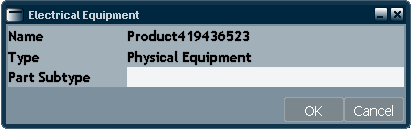
Specify a Name, for example Equipment.
Note:
In the Product Resource Management Editor > Electrical Resources, you can customize the Part Subtype in order to have a drop down list with pre-defined names. For more information, please refer to Creating an Equipment Subtype Filter in Product Resource Management.
Click OK to validate.