Modifying End Style of a Pipe

An End Style is a pipe attribute that determines the auto parts that can be placed on it. You may need to modify the end style of a pipe to make it compatible with the connecting parts.

In Project Resource Management (PRM), under Piping Design Resources, the Pipe Fabrication End Style table is defined. This table contains a list of all possible end styles for a pipe. The End Style command displays this table and allows you to select an end style.

This table is associated with a standard. Based on the standard defined on the pipe, the Pipe Fabrication End Style table displays the end styles. If you try to modify the end style of a pipe on which no standard is defined, the End Style command is unable to locate the Pipe Fabrication End Style table and an error message appears.

The Pipe Fabrication End Style table is filtered on the basis of Material, if it is defined on the pipe.


Before you begin: Open a document containing the pipe for which you want to modify the end style.
  1. Click Modify in the Compass Toolbar.

    The balloons appears.

  2. Select a part and then select the node.

  3. Click Edit > Edit End Style in the balloon.

  4. Click Edit End Style .

    Note: If the end style is Unset, you can assign it by using Edit. If standard is not defined on the pipe, the following message is displayed.

    The Table Browser dialog box displays the PipeFabEndStyle (Pipe Fabrication End Style) table. It shows a list of end styles that can be assigned to the pipe.
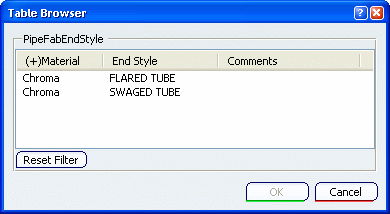


  5. Select an end style and click OK.

    The selected end style appears in the Edit End Style dialog box. You can also copy the end style from one end point to the other by using Copy End Style .

  6. Click OK.

    The end style is modified for the selected pipe.

    For more information, see also About Project Resource Management.