|
Edit the Properties of the Selected Object(s)
You can edit the properties of one or more selected objects.
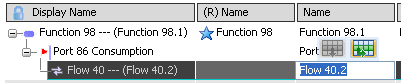
Select a cell in the spreadsheet table.
Note:
You can also multi-select objects, and modify properties for all of them.
Note:
If the Anchor Balloon  mode is not selected from the title area, the contextual Balloon toolbar appears. mode is not selected from the title area, the contextual Balloon toolbar appears.
Enter your property (text, real, or integer) or select a property from the drop-down list (as for port direction, for instance).
The property is immediately applied.
Select Display/hide additional properties  . .
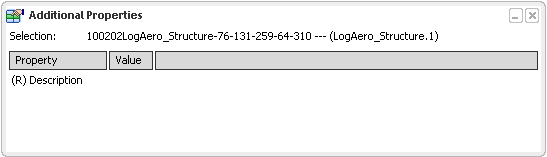
The Additional Properties dialog box appears and displays more information about the selected object(s).
Note:
- (R) indicates that the selected element is a reference.
- Multi-selection is allowed with the Display/hide additional properties command.

Edit the Properties of the Root Object
When no object is selected, you can edit the properties of the root object.
Double-click the root system and click
Spreadsheet Editor  . .
The Spreadsheet Editor opens.
Click Display Additional Properties .
The Additional Properties dialog box opens.
Enter a description in the Description field. The description is added. Select a row in the table. The Additional Properties window displays the description you entered. Note:
When there is no selection, click anywhere in the background to display the root properties.
|