About the Knowledge Pattern Editor | |||||
|
| ||||
Accessing the Knowledge Pattern Editor
To access the Knowledge Pattern Editor, click Start  > Knowledgeware > Templates > Knowledge Template. Then click Knowledge Pattern
  in the Templates Creation Toolbar. The Knowledge Pattern Editor opens.

Status Toolbar
The Status toolbar comprises three main functions.
Check to Work in Optimized Mode  :
Lets you select an object in the specification tree or in the geometry area. It displays only the first level of objects in the editor, right below the selected object: it proves to be very useful when working with large models. Suppose your document contains a Geometrical Set object which itself is made up of several Shape Design points: If you press this icon, the Geometrical Set object in the specification tree displays only the first level of parameters below the Geometrical Set (the point coordinates are not displayed.). If you press this icon another time to disable the function, the Geometrical Set object displays all the parameters related to the points (the parameters defining the coordinates are included into the list).
:
Lets you select an object in the specification tree or in the geometry area. It displays only the first level of objects in the editor, right below the selected object: it proves to be very useful when working with large models. Suppose your document contains a Geometrical Set object which itself is made up of several Shape Design points: If you press this icon, the Geometrical Set object in the specification tree displays only the first level of parameters below the Geometrical Set (the point coordinates are not displayed.). If you press this icon another time to disable the function, the Geometrical Set object displays all the parameters related to the points (the parameters defining the coordinates are included into the list).
Note: By clicking this button, the editor does not recognize parameters any longer. So if you enter the name of a parameter into the editor without selecting it in the specification tree or in the geometry, it will not be recognized.
Check to Have an Automatic Expression Parsing : Lets your visualize syntax errors.
Check to Have an Automatic Text Formatting  : Lets you indent the script body.
Actions Toolbar
The Actions toolbar comprises the following functionalities:
Find and Replace Text  : Lets you find and replace text.
Shows Language Browser : Lets you access the Language Browser (browser of types). To use this browser, you can either select the objects you want to work with in the geometry or click ... to select the type in the list.
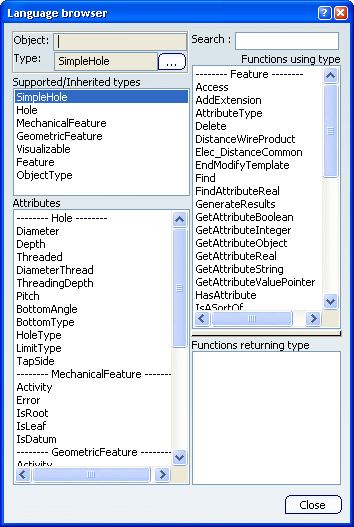
- The Supported/Inherited types field provides you with a list of the distinct types supported by the selected type. It also provides a list of the types that the selected type inherits from.
- The Attributes field lists the possible attributes from the types and those of the supported and inherited types.
- The Functions using type field lists the functions and methods whose first argument is a type from the Supported/Inherited types list.
- The Functions returning type field lists the functions and methods returning the selected type.
Highlight Syntax Error Line : Lets you reach the line containing the syntax error.
URLs and Comments : Lets you to associate a URL or a comment to the pattern.
Erase the text Field : Allows you remove the script from the editor.
Execution Field
The Options field comprises four functions:
-
If Relative referencing is checked, you are in a position to build an object on one of the user object instances. This rerouting mechanism is applied also when the list of instances grows or shrinks. A relative referencing option allows to consider that the links between such objects and instances rely on an index based on the last instance.
-
By checking Optimize memory (No Undo), you cannot undo the computation of the Knowledge Pattern. This option ensures a reduction of the computation time and a drastic decrease in memory consumption during the process.
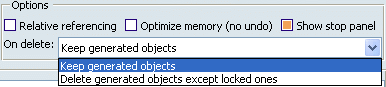
If Show stop panel is checked, you are able to display the Knowledge Pattern Execution Window when running the pattern, thus enabling you to stop the execution if needed.
The On delete option comprises two modes: If set to Keep Generated Objects, no object is deleted. If set to Delete Generated Objects except locked ones, all objects are deleted.
Knowledge Pattern Lists
The Knowledge Pattern Lists is a field comprising three buttons:
- By clicking Add, you can add lists to the Knowledge Pattern.
- The Remove button allows you to delete a list.
- By clicking Paste in editor, you are able to insert the created list into the script.

Editor
The Editor enables you to enter the Knowledge Pattern script. The language to use with this editor is the Engineering Knowledge Language (EKL).
When working with "for i while" expression:
-
If it is not modified by the user, it is automatically incremented by 1 at each iteration.
-
If it is modified by the user, there is no automatic incrementation. You can write: let i (integer) i = 1 for i while i <= 10 { ... i = i + 2 }. You can use negative increments as well.
Contextual Menu
There are two contextual commands improving display that are available in the contextual menu:
The command called Reframe on object under cursor lets you reframe on the object both in the 3D visualization and in the specification tree.
- The Center graph on object under cursor command locates the object in the specification tree.