FE Model | ||
| ||
3D Shape Automatic Open Behavior
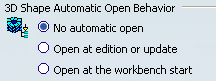
This option permits to automate or not the open of 3D shapes contained in the product when you enter the Finite Element Modeling workbench. Select the desired option:
- No automatic open
- Not to open automatically the 3D shapes when you enter the Finite Element Modeling workbench.
- Open at edition or update
- To open the 3D shapes when you edit or update an object belonging to a finite element model representation.
- Open at the workbench start
- To fully open the 3D shapes when you enter the Finite Element Modeling workbench.
 By default,
No loading is selected.
By default,
No loading is selected.

Automatic Naming

- Rename meshes and groups under meshes
- This option lets you automatically rename meshes and
groups under a mesh part. If you select this option, CATIA
does the following:
- Names mesh parts with the name of the mesh support (geometry or publication).
- Names groups under a mesh with the name of the parent mesh.
Be aware that:
- The automatic naming is performed when you create a mesh or a group; therefore, if you rename the mesh support, the mesh is not renamed accordingly.
- Automatic naming may create problems with unique names. For example, if you create several groups of the same type with the same parent mesh as a support, all the created groups have the same name.
- The automatic naming option does not provide National Language Support (NLS).
- The automatic naming option does not account for meshes created without a geometric support, such as extruded, translated, filler meshes, orphan meshes, coating meshes, and sweep meshes.
By default,
the Rename meshes and groups under meshes
check box is cleared.