Click Insulation  in the Technological Behavior toolbar.
The Insulation Spec dialog box appears.
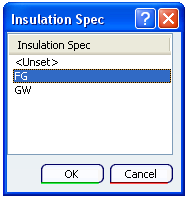
Select an insulation specification and click OK.
The Table Browser dialog box for Insulation Definition opens.
Select an insulation configuration and click OK.
Insulation specification is applied to the part.
Notes:
Also, the part discipline is set as Piping_Insulation.
To check the part discipline, select the part and use Edit > Properties command.
The part discipline is displayed in the Discipline box of the Properties dialog box.
Add a port to the insulation part.
For more information about ports, see Managing Ports.
The Insulation_Port1 sub-node is created under Publications node in the specification tree.
Add the insulation part reference in the catalog.