Recognizing a Chamfer | ||
| ||
Click Manual Feature Recognition
 .
The Feature Recognition dialog box that appears displays
a list of features you can recognize.
.
The Feature Recognition dialog box that appears displays
a list of features you can recognize. 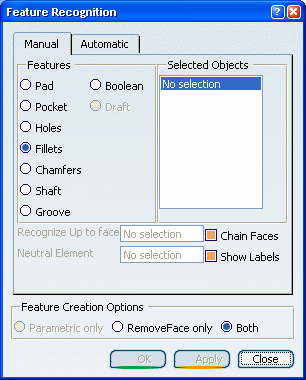
Important: Using this product release, the features you can recognize are the following ones: - Pad
- Hole
- Fillet
- Chamfer
- Shaft
- Groove
- Boolean
- Draft
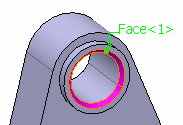
Select the face as shown.
Once selected, it becomes pink.
Click OK to confirm and close the dialog box. A chamfer feature has been recognized. Chamfer.1 has been added to the specification tree.
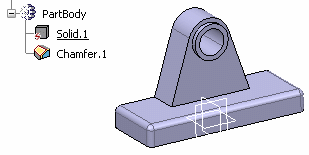
The application can recognize several chamfers in a single step.