Creating a Flexible Board | |||
| |||
Click Create Flexible Board
 .
.
- If the axis system is not compliant with the following rule: the axis system must be on top of the sheetmetal feature with Z-direction opposite to the material direction, a warning appears:
Current axis system defined on Board is not compatible with Flexible Circuit Board.
Please define a compatible axis system as current or create a new axis system adhering to following rules:
- Axis system should be direct
- Axis system origin should be on top or bottom surface of the Sheetmetal feature.
- Z-direction of the axis system should be same as direction of vector from Board Bottom to top surface.
Delete the invalid axis system and create a new one by clicking Axis System
 .
. - If no axis system has been defined, a warning is displayed:
No axis system has been defined.
Select YES to create axis system automatically.
Select NO to EXIT the command.
Yes / No
If you click Yes, a valid axis system will be created on the first sheetmetal feature found automatically and it will be set Current (which is compatible fo Export As IDF File). And you obtain:
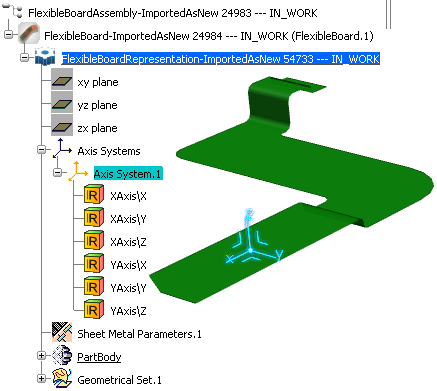
You can observe:
- The axis system is created on the first sheetmetal feature found.
- All the sheetmetal features turn green.
- In the specification tree, the product icon
 changes into:
  .
.
Note:
- The Create Flexible Board command can be launched at any time to check the axis system.
- If the board is already a CBD board (not a flexible board), an error message is displayed.
- If all the parameters are correct, especially for axis system, a dialog box confirms the flexible board creation has been successful.
- If the axis system is not compliant with the following rule: the axis system must be on top of the sheetmetal feature with Z-direction opposite to the material direction, a warning appears: