Customizing Bar Search Types |
| Technical Article |
AbstractThis article describes how to define new predefined queries and define the syntax to be used in Bar Search to launch a specific predefined query. |
You can fully customize the queries you want to plug to the Bar Search. You can specify the combinations of attributes to be used for all searches on main types. You can also modify predefined queries delivered with the product and define new predefined queries.
To be able to specify the predefined query to trigger among all queries, a special syntax is needed. Basically, the user will have to type the name of predefined query or an abbreviation associated with the predefined query before the criteria using ":" as separator. For example, considering the predefined query "Product", the user should type:
"Product: my_criteria" or "prd: my_criteria" because
"prd" has been defined as an abbreviation for predefined query "Product".
They will be available in the Search Results window via buttons. Clicking on a button will perform a new search using this customized query using the same criteria. Results are displayed in a new tab page.
A predefined query supports following characteristics:
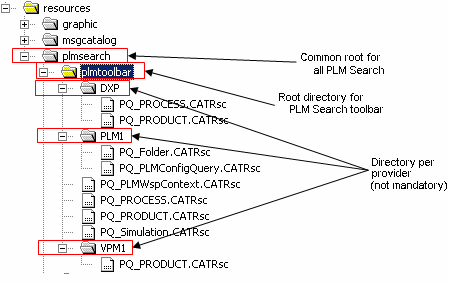
You can deliver resource files specific for each connector. For this purpose following file tree structure is proposed for resources files:
All the *.CATRsc files are found in the directories pointed by the official environment variable CATInstallPath concatenation. Typically for a 3DLive installation:
CATInstallPath=C:\Program Files\Dassault Systemes\3DLive\custo\intel_a;C:\Program Files\Dassault Systemes\3DLive\intel_a
To simplify, let's set CATInstallPath=path1;path2
Resources files are specific for each connector. Considering a connection to a Live
3D XML data source, then the following paths will be parsed looking for valid predefined
queries definitions:
Of course path2\resources\plmsearch\plmtoolbar\DXP may not exist; it will be skipped.
It is strongly recommended to the customer to deliver its own customization files in custo directory path1 and not to modify the files delivered by Dassault Syst笥s in path2.
| Warning: The order in which the directories are parsed can be determined, but for each directory we cannot predict the order in which the files are parsed. In addition, the parsing of the CATRsc files is not ordered either. |
Here is the minimum syntax to declare a predefined query:
My_Predefined_Query_Id.Accessibility = "[plmtoolbar] [links]";
My_Predefined_Query_Id.Definition = "Custo_Id.Modeler_Id.CoreType";
My_Predefined_Query_Id.Attributes = "Attr1_Id Attr2_Id ... AttrY_Id";
My_Predefined_Query_Id.AdvConditions = "CI LV";
My_Predefined_Query_Id.CATNls = "File_Name";
(Repeat for each predefined query ...)
If you want to define queries on extensions, you should add following declaration:
My_Predefined_Query_Id.ExtensionsNb = "N";
My_Predefined_Query_Id.Extension1.Definition = "Modeler_Id.TypeId";
My_Predefined_Query_Id.Extension1.Attributes = "Attr1_Id... "
(Repeat for each extension ...)
My_Predefined_Query_Id.ExtensionN.Definition = "Custo_Id.Modeler_Id.CoreType";
My_Predefined_Query_Id.ExtensionN.Attributes = "Attr1_Id Attr2_Id ... AttrZ_Id";
Some remarks on extensions declaration:
To define a complex criterion for an attribute, you should append to the attribute identifier AttrN_Id the followings keys:
"... AttrN_Id|AttrN_Op|AttrN_Value|AttrN_EndValue ...";
| Operators (syntax in CATRsc files) | |||||||||||||
|---|---|---|---|---|---|---|---|---|---|---|---|---|---|
| NULL | NOT_ NULL |
EQ | NOT_ EQ |
GT | GTEQ | LT | LTEQ | LIKE | NOT_ LIKE |
BETWEEN | NOT_ BETWEEN |
||
| T y p e |
String | ||||||||||||
| Int | |||||||||||||
| Double | |||||||||||||
| Boolean | |||||||||||||
| available for type/operator combination | |
| not applicable for type/operator combination |
| Warning: For the operators, the case must be respected. |
Valuated attributes are processed differently:
Here is a concrete usage of valuated attributes. It enables to define a predefined query to search for all the Product references John is responsible for:
//John's Products
(...)
JohnPrd.Definition = ".PRODUCT.PLMCoreReference";
JohnPrd.Attributes = "PLM_ExternalID V_description V_user|EQ|John";
(...)
Considering that end-user typed "*" in Bar text filed, above definition will be interpreted by the system as:
Search for "Product(abstract)" matching: {Name Like * OR Description Like *} AND {Responsible = John}
Predefined queries are defined in several files. It may appear that a predefined query with the same identifier already exists when parsing it. In this case only the first definition is kept.
Considering that you are connected to Live 3D XML connector (DXP):
You have defined in path1\resources\plmsearch\plmtoolbar\DXP\PQ_Sample1.CATRsc
Sample1.Accessibility = "plmtoolbar links";
Sample1.Definition = "CUSTO1.MODELER1.PLMCoreReference";
Sample1.Attributes = "Attr1";
Sample1.CATNls = "PQ_Sample";

Sample2.Accessibility = "";
You have defined in path2\resources\plmsearch\plmtoolbar\DXP\PQ_Sample2.CATRsc
Sample1.Accessibility = "plmtoolbar links";
Sample1.Definition = "CUSTO1.MODELER1.PLMCoreReference";
Sample1.Attributes = "Attr1 Attr2";
Sample1.CATNls = "PQ_Sample";

Sample2.Accessibility = "plmtoolbar links";
Sample2.Definition = "CUSTO1.MODELER1.PLMCoreRepReference";
Sample2.Attributes = "Attr1";
Sample2.CATNls = "PQ_Sample";
The file PQ_Sample1.CATRsc is parsed first; its definition of Sample1 replaces the Sample1 of PQ_Sample2.CATRsc and Sample2 of PQ_Sample2.CATRsc is totally deactivated and will not be accessible at all.
This mechanism can be used by the customer to "overload" or even deactivate predefined queries delivered with the product.
For example: a customer wants to overload the predefined query "Product" to map its customized type and deactivate the predefined query "Representation" delivered with the product because he does not want to have its representations "queriable" from the Bar Search.
Here is how predefined queries related with Product model (Product, Representation) are written in file $installpath\intel_a\resources\plmsearch\plmtoolbar\PLM1\PQ_PRODUCT.CATRsc
(...)

//Definition of Product Reference
Part.Accessibility = "plmtoolbar links";
Part.Definition = ".PRODUCT.PLMCoreReference";
Part.Attributes = "PLM_ExternalID V_description V_user";
Part.CATNls = "PQ_PRODUCT";

//Definition of Representation Reference
Representation.Accessibility = "plmtoolbar links";
Representation.Definition = ".PRODUCT.PLMCoreRepReference";
Representation.Attributes = "PLM_ExternalID V_description V_user";
Representation.CATNls = "PQ_PRODUCT";

(...)
He has to create the file PQ_MyProductCusto.CATRsc in this directory $installpath\custo\intel_a as below:
// Deactivation of Representation Reference
Representation.Accessibility = "";
You can fully customize the queries you want to plug to the Bar Search. The list of commands proposed can now be modified and enriched by the customer. To enable the user to specify the predefined query he wants to trigger, special syntax is needed.
Basically, the user will have to type the name of predefined query or an abbreviation associated with the predefined query before the criteria using ":" as separator. For example, considering the predefined query "Product", the user should type:
"Product: my_criteria" or "prd: my_criteria" because
"prd" has been defined as an abbreviation for predefined query "Product".
If the user does not type a recognized syntax (the comparison is case sensitive), the last-used predefined query will be executed. Initially (no setting or preference found), the first predefined query of the list is used.
Titles and Abbreviations are defined with following syntax in a CATNls file:
My_Predefined_Query_Id.Title = "My_Predefined_Query_Alias";
My_Predefined_Query_Id.Abbreviations = "Abbr1|Abbr2| ... |AbbrY";
(Repeat for each predefined query ....)
Notice that each abbreviation is separated with "|". That means that an abbreviation can contain a space but it is obviously recommended to keep abbreviations as concise as possible.
The Title is the text displayed as a kind of hyperlink displayed in result tab page when a search is triggered from the Bar Search. The associated ShortHelp is the message displayed in the tooltip when the cursor is on these buttons:
My_Predefined_Query_Id.ShortHelp = "...";
These CATNls files should be delivered in the standard directory to ensure standard translation process: $installpath\intel_a\resources\msgcatalog. It is strongly recommended to have the same name for CATRsc and CATNls files but this is not mandatory. Two predefined queries declared in the same CATRsc file can reference two different CATNls files. Reciprocally, different predefined queries declared in several files can reference a unique CATNls file.
Writing just two resources files (a CATRsc and a CATNls) with simple syntax and putting them in custo-dedicated directory of its installation, customer can enrich the list of predefined queries he is able to trigger from the Bar Search.
| Version: 1 [Jan 2007] | Document created |